We are very excited to announce the beta release of our new versioned Expo CLI that is installed locally in your project instead of globally on your computer.
Versioning the CLI offers the following benefits:
- Longevity: Projects will continue to work as expected for much longer since all of the tooling is versioned.
- Stability: We can safely deprecate features without risking projects breaking unexpectedly. The CLI will also have a proper beta period during the SDK beta releases. This will help us to ensure features are stable.
- Automation: CI will be simpler and easier to setup. No more caching global modules, configuring global versions, or unexpected version changes.
- Speed: The new CLI
npx expoinstalls and updates substantially faster thanexpo-cli.
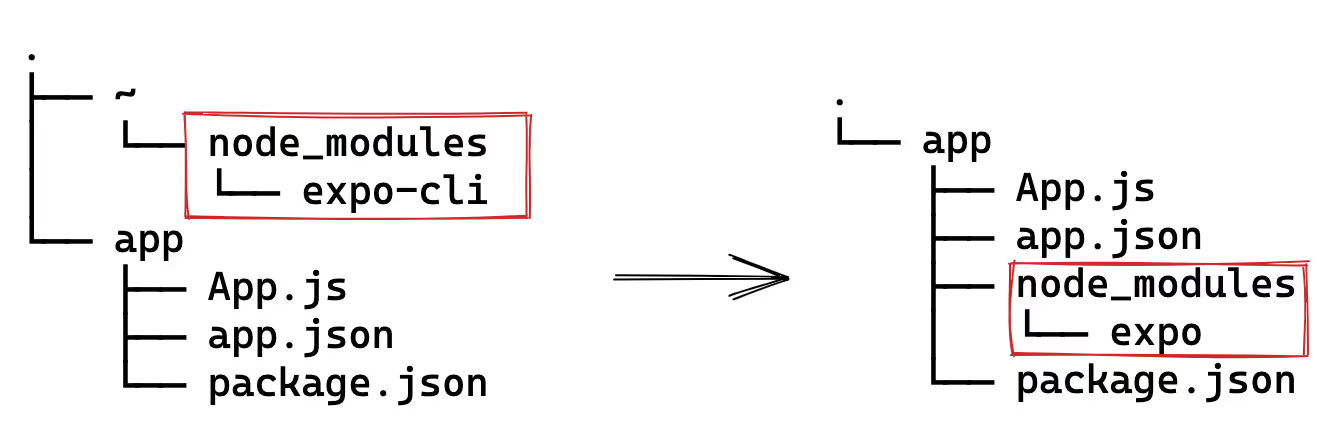
Self contained dependencies make caching in CI easier.
Testing
Enable the environment variable EXPO_USE_BETA_CLI=1 then run npx expo -h to view the CLI commands.
Features to test:
npx expo start— Starting the development server for your app.npx expo prebuild— Generating native code.npx expo install— Install versioned packages in your project. This command also comes with the new--checkand--fixflags. You can even fix individual packages likenpx expo install --fix react-native expo-sms.npx expo export— Bundle the JS and assets for hosting with EAS Update. This only supports the new format (expo export --experimental-bundlein the global CLI).npx expo run:android— Build Android projects locally. Now with the new--no-build-cacheflag for running clean builds.npx expo config— View the project config for your app.- We've also added the auth commands for signing manifests:
login,logout,register,whoami.
Known Issues
- Automatic web setup is buggy and requires restarting the process.
- Tunnels may have issues when running Webpack and Metro at the same time.
- Opening iOS simulators for the first time is slower than usual (make it work > make it right > make it fast).
Beta Notice
Rewriting the CLI is a very large project, not all features are complete. Please report bugs on the expo/expo repo. You can continue to use the stable expo-cli for the foreseeable future, we will be freezing feature additions to ensure it remains stable. All new features will be added to the versioned CLI.
If for some reason you want to fully decouple the beta CLI from your project, you can resolve the 0.0.0 version which is blank.
package.json
{"resolutions": {"@expo/cli": "0.0.0"}}
In the coming two quarters, we will also be releasing:
npx expo run:ios-- Build iOS projects locally.npx expo customize-- Generate static project files (replacingexpo customize:web).- Bundle command for Webpack (replacing
expo build:web). - Standalone tool for bootstrapping projects (replacing
expo init). - Standalone tool for upgrading projects to new versions (replacing
expo upgrade).
If you are still using the deprecated expo build or expo upload commands, please migrate to eas-cli.